FreeCell Solitaire
Solitaire Card Games , Inc.Card
4.54.87K Reviews
- Version
- 3.19.0.20251209
- Installs
- 10.00M
- Age Rating
- Everyone
Screenshots
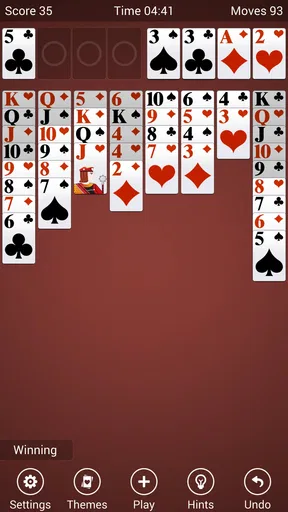
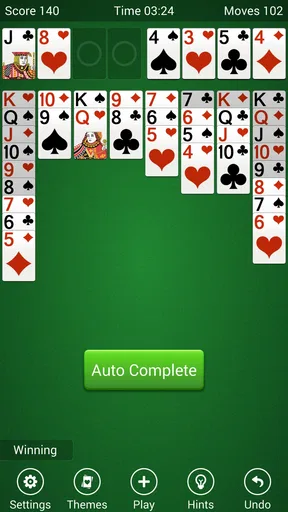
Our Review of FreeCell Solitaire
 Analysis by Appyee
I spent time with FreeCell Solitaire as a quiet, familiar card game rather than as a flashy mobile distraction. That distinction matters. This is a free FreeCell title from Solitaire Card Games , Inc., built around the classic patience format and aimed at people who enjoy thinking through a hand one move at a time. It is available to everyone, supports Android 7.0 and later, and has been around since August 17, 2016. The current version is 3.19.0.20251209.
My first impression was that the game understands why FreeCell remains appealing: the rules are easy to recognize, but the decisions are rarely automatic. You can play for a few minutes while waiting somewhere, or settle into a longer session where every empty space and exposed card changes the plan. It does not need a complicated theme to work. The cards themselves provide the challenge.
How I Decide Whether This FreeCell Game Fits
When I choose a solitaire app, I look beyond whether it can deal cards. I want to know how quickly I can begin, whether the layout remains readable on my phone, whether the game rewards careful planning, and whether it feels comfortable during short sessions. I also consider what kind of player I am that day. Sometimes I want a relaxing card puzzle; other times I want a faster game with more variation or a stronger sense of progression.
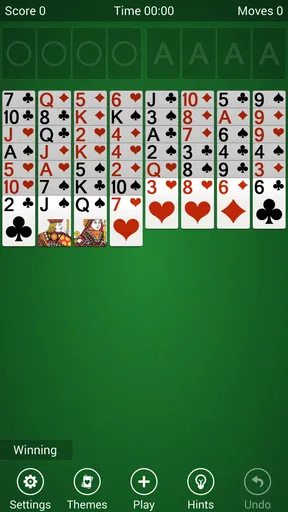
FreeCell Solitaire makes the most sense if you already like open-information puzzles. Unlike hidden-card solitaire, the important cards are visible from the start, so success depends more on sequencing than on luck. That makes each hand feel like a problem to solve. I can inspect the columns, identify a blocked card, and work backward toward the move that will free it.
That open structure also changes the emotional rhythm. A poor move is usually something I can learn from, not merely bad luck. I have to think about whether moving a card now will create a useful empty column, whether I am wasting a free cell too early, and whether a temporary arrangement will leave enough room for the next sequence. These small decisions are what make the game more engaging than simply tapping obvious matches.
For a new player, the main question is whether the classic FreeCell rules feel intuitive. They are approachable, but the game becomes more satisfying after you stop treating every legal move as a good move. I recommend beginning slowly and using the early part of a hand to create space rather than rushing cards toward the foundations. That habit alone makes the difference between a controlled game and a crowded one.
The best everyday use is short, focused play
I found the game particularly suitable for small gaps in the day. Imagine sitting on a train, waiting for an appointment, or taking a short break away from work. A FreeCell hand gives your attention something definite to do without requiring sound, a story, or a long commitment. You can examine the board, make a few deliberate moves, and stop when your break ends.
It also works well as a low-pressure evening activity. Because the central information is visible, I do not feel pushed to react quickly. I can pause before committing to a move and return to the position with a clearer head. That makes it a better fit for players who prefer calm concentration over rapid tapping.
On the other hand, I would not choose it for someone who needs constant novelty. The appeal is in refining decisions within a familiar ruleset, not in discovering a new world or collecting elaborate rewards. If your ideal card game includes dramatic effects, changing objectives, or a strong competitive layer, another category may suit you better.
What makes the open board strategically useful
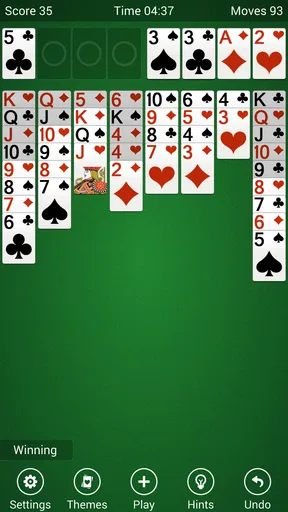
The most useful way to approach a hand is to treat the four free cells as temporary parking spaces, not as extra storage. Filling them too soon can leave you unable to move a sequence when the board becomes crowded. I try to keep at least one available whenever possible, especially before rearranging a long column.
Empty columns are even more valuable. They let you move a card or a properly ordered group into a new position, which can expose cards that were previously buried. I often resist an attractive move if it occupies the only open column without revealing anything useful. The immediate improvement may look good, but the resulting lack of space can make the next several decisions much harder.
Another practical habit is to inspect the lower cards before building a long descending sequence. A neat alternating stack can be helpful, but it may also hide the exact card needed to open another column. I prefer arrangements that expose more options, even when they look less tidy. In FreeCell, visual order is not always strategic order.
These are small techniques, but they are the reason I see this game as more than a passive time filler. The board teaches you to preserve flexibility. A move that creates two possible continuations is usually more valuable than one that merely advances a card immediately.
Where this app wins against familiar solitaire choices
Compared with hidden-card solitaire, this version of FreeCell offers a more deliberate kind of challenge. In a traditional deal where important cards are concealed, a blocked game can feel determined by the shuffle. Here, I can usually trace the problem back to a decision, such as using a free cell at the wrong moment or closing a column before its useful cards are accessible.
That makes it a strong choice for players who enjoy logic and planning. It is also easier to learn from repeated attempts because the visible layout gives you information about what went wrong. If you like puzzles where the solution develops from careful organization, this is the more satisfying direction.
It also compares well with fast, score-focused card games. FreeCell does not need me to chase a timer or make a chain of quick taps. I can play at my own pace and concentrate on the structure of the hand. For a short break, that slower pace can be a benefit rather than a weakness.
The game’s broad reach supports that use. It is free, rated for everyone, and has passed the ten-million-install mark, while its average rating is 4.5 from around 85 thousand ratings. Those figures do not guarantee that every player will enjoy it, but they do reflect a well-established audience for this particular style of card game.
Where another category may be a better match
I would steer some players elsewhere. If you want the uncertainty and occasional lucky turnaround of classic Klondike-style solitaire, a hidden-card format may feel more exciting. FreeCell’s transparency can reduce suspense because you can see the obstacles early. That is excellent for planning, but less appealing if you play mainly for surprise.
Players who want online competition should also compare it with multiplayer card games. FreeCell Solitaire is best approached as a personal puzzle session. It does not replace the energy of facing another person, reacting to an opponent, or building a social routine around matches.
Likewise, people who use games as a long-term collecting hobby may prefer a title with a broader progression structure. I would not install this expecting a role-playing system, a narrative campaign, or a changing set of genres. Its strength is narrower: it gives you a familiar ruleset and asks you to improve your choices.
There is a trade-off in that focus. Once you understand the basic patterns, the experience can feel repetitive if you need frequent visual change. I personally see that repetition as useful when I want a dependable mental exercise, but I would not call it a universal advantage. The right choice depends on whether consistency relaxes you or makes the game feel limited.
Small habits that improve a difficult hand
When I reach a position that looks stuck, I avoid immediately undoing everything. First, I look for cards that can be moved to foundations without reducing the number of useful options in the tableau. Advancing a card is not automatically correct if it removes a needed color or rank from a temporary sequence, so I consider what the move changes elsewhere.
I also try to uncover low cards early. A low card can often begin a foundation safely, while a high card may remain trapped unless enough space is created beneath it. This does not mean every low card should move at once. It means I treat access as a priority: a card that opens several future moves can be more important than one that merely looks ready to finish.
When using an empty column, I prefer to place a card that exposes a valuable hidden position rather than simply making the board look balanced. The empty space is a resource, and its best use is often temporary. Once it has opened a path, I try to preserve another route for moving cards instead of filling every gap immediately.
These choices make the game more forgiving as a learning tool. Even when I lose, I can usually identify a moment where I spent flexibility too early. That clarity is one of the strongest reasons to choose this app over a more luck-driven solitaire alternative.
What the free price means in practical use
The price is one of the easiest reasons to try it: the game is free. That lowers the cost of experimenting, especially if you already know that FreeCell is the solitaire style you want. You can install it for a quick test during an ordinary break without treating the decision like a major purchase.
Still, “free” does not automatically mean it is the best choice for every situation. The real cost can be attention. If you want a game that changes dramatically from session to session, you may spend time looking for variety that this focused format is not designed to provide. I would judge it by how often you want a reliable FreeCell board, not by how many unrelated activities it offers.
The age rating of Everyone also makes it a straightforward choice for households looking for a simple card game. The rules are familiar enough to explain across generations, and the visible-board format gives a parent, friend, or older relative something concrete to discuss while learning. I would still teach the strategic value of empty spaces rather than only explaining which cards can move.
For device compatibility, Android users need version 7.0 or later. That is useful to check before switching from an older phone or tablet. If your device meets that requirement, the app’s long availability and current version suggest that it remains maintained as an active product rather than an abandoned classic.
How much effort it takes to switch from another solitaire app
Switching is easy if you already understand FreeCell because the important adjustment is not learning a new card language; it is learning to value future mobility. A player coming from Klondike may initially move cards toward the foundations too eagerly or wait for luck to reveal a solution. I would spend the first few hands practicing board inspection instead of chasing quick finishes.
The larger switching cost is emotional rather than technical. FreeCell can feel less forgiving because the board shows you the consequences of your choices. If you are used to blaming an unlucky deal, you may find the directness uncomfortable at first. I think that is also the reason it becomes rewarding: improvement feels connected to better planning.
Before replacing your current solitaire app, I would ask what you return to it for. If it is a familiar way to relax, FreeCell Solitaire can serve that role with more thought involved. If you enjoy several solitaire variants in one place, switching completely may not be necessary. Keeping a broader collection for variety and using this game specifically for focused FreeCell sessions is a sensible compromise.
One practical workflow is to use it in two modes. During a short break, make only a few moves and stop before the board becomes mentally demanding. During a longer session, review the full layout first and identify which column you want to open. This prevents the game from becoming either mindless tapping or an unnecessarily intense puzzle.
My recommendation for different kinds of players
I recommend FreeCell Solitaire to anyone who wants a free, familiar card puzzle where planning matters more than luck. It is especially good for patient players, people who enjoy improving through mistakes, and anyone looking for a quiet activity that fits naturally into short gaps in the day. The open layout gives every move a reason, and the rules are simple enough to revisit after a long break.
I would be more cautious if your priority is social play, dramatic presentation, constant novelty, or a large collection of unrelated card modes. In those cases, a multiplayer title, a broader solitaire suite, or a more visually varied game may be a better first installation. This app succeeds by staying focused, so its limits are closely tied to its strengths.
My final advice is to give it several hands rather than judging it after one frustrating deal. Keep the free cells available, create empty columns with a purpose, and look for moves that expose options instead of merely advancing cards. Once that mindset clicks, the game becomes a compact daily exercise in planning.
After years of seeing solitaire apps compete for attention with extra layers, I appreciate this one’s directness. Developed by Solitaire Card Games , Inc., it has built a substantial audience without needing me to treat it as anything other than a well-defined FreeCell game. If you want a calm card puzzle with visible information and meaningful decisions, this is an easy recommendation.
Verdict
Strengths of FreeCell Solitaire
- Works offline, making it ideal for travel or areas with limited connectivity.
- Undo options help recover from mistakes without restarting the entire game.
- Simple controls make it accessible for both beginners and experienced players.
- Most deals are winnable, rewarding careful planning rather than luck.
- Short rounds fit well into quick breaks or casual play sessions.
Limitations of FreeCell Solitaire
- Ads may interrupt gameplay or take up screen space in the free version.
- The basic presentation may feel repetitive for players seeking more variety.
- Some deals require lengthy planning and can feel slow to complete.
- Small cards or buttons may be difficult to use on compact phone screens.
- Advanced players may miss detailed statistics or deeper customization options.
Similar Picks in This Category
View All
Solitaire - Classic Card Games
MobilityWare4.6

UNO!™
Mattel163 Limited4.3

Spider Solitaire: Card Games
MobilityWare4.6

Solitaire.com - Classic Cards
Tripledot Studios Limited4.7

Plants vs. Zombies™ Heroes
ELECTRONIC ARTS4.1

Hearthstone
Blizzard Entertainment, Inc.4.1
Frequently Asked Questions
What is FreeCell Solitaire, and how is it played?
FreeCell Solitaire is a classic single-player card game in which the goal is to move all cards to four foundation piles, arranged by suit from Ace through King. Unlike many other solitaire variations, nearly every card is visible from the beginning. You build tableau columns in descending order with alternating colors, while using four temporary free cells to carefully organize and move cards.
Is FreeCell Solitaire free to download and play?
Most FreeCell Solitaire apps can be downloaded and played for free, although the exact model depends on the version you choose. Some editions include advertisements, optional purchases, or premium upgrades that remove ads and add extra features. Before installing, check the app store listing for pricing, in-app purchases, and whether an internet connection is required.
Does FreeCell Solitaire require an internet connection?
In many versions, FreeCell Solitaire can be played offline after installation, making it suitable for travel or situations without mobile data. However, certain features may require an internet connection, including advertisements, cloud synchronization, leaderboards, daily challenges, or account services. Availability can vary between Android and iOS versions, so review the app’s requirements before downloading.
Are all FreeCell Solitaire games winnable?
FreeCell is known for having a very high percentage of solvable deals because all cards are visible and players can plan their moves in advance. Nevertheless, not every deal is guaranteed to be winnable, especially when moves are made without considering future access to free cells and empty columns. Undo tools can help you test strategies and recover from mistakes.
What features should I look for in a FreeCell Solitaire app?
A good FreeCell Solitaire app should offer clear card graphics, responsive controls, useful undo and redo options, hints, automatic card movement, and easy-to-read statistics. Daily challenges, deal numbers, themes, left-handed layouts, sound controls, and cloud progress can also improve the experience. It is worth checking privacy details and ad behavior before choosing a specific version.
Play our best games!


